
Geekflare Tools
Free80+ free web tools for security, SEO, DNS & developers
AI Summary
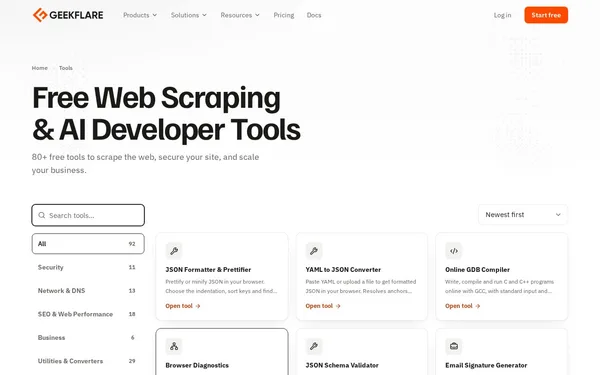
Geekflare Tools is an extensive collection of over 92 free web tools for developers, SEO professionals, and security analysts. The tools cover areas such as JSON processing, web scraping, DNS analysis, HTTP security headers, SERP checks, and AI extraction. They run entirely in the browser without installation and are suitable for technical diagnostics, website analysis, and development tasks. The tools were previously offered under the name Domsignal.
✓ Pros
- +Over 92 tools in one central platform – no need to switch between tools
- +Completely free and usable directly in the browser without installation
- +Broad topic coverage: security, DNS, SEO, developer tools, and AI
✗ Cons
- −Many tools rely on Geekflare's own API, creating a dependency on their infrastructure
- −No interactive debugger (e.g. GDB session) – some tools have functional limitations
Use Cases
- →Check HTTP security headers of a website (CSP, HSTS, X-Frame-Options)
- →Format, validate, and test JSON against a JSON schema
- →Analyze the web scraping feasibility of a URL (robots.txt, anti-bot, JS rendering)
- →Retrieve SERP results for keywords from different countries and check domain position
Who is it for?
Ideal for web developers, DevOps engineers, SEO professionals, and security analysts who need fast, browser-based diagnostic and analysis tools.
Tags
What is Geekflare Tools?
Geekflare Tools is a browser-based collection of over 92 free web tools for developers, SEO professionals, and security analysts. All tools run directly in the browser with no installation required. The focus is on technical diagnostic tasks: checking HTTP security headers, analyzing DNS configurations, validating JSON data, or querying the SERP position of a keyword across different countries.
Core Features
- HTTP Security Header Check: Analyzes whether a website correctly delivers CSP, HSTS, X-Frame-Options, and other security headers.
- JSON Tooling: Format, validate, and test against a JSON schema, directly in the browser.
- Web Scraping Analysis: Checks a URL for scraping barriers such as robots.txt rules, anti-bot mechanisms, and JavaScript rendering requirements.
- SERP Queries: Retrieves search results for any keywords from various countries and displays the current position of a domain.
- DNS Analysis: Enables quick queries on DNS records and configurations without an external tool.
Who is Geekflare Tools for?
Web developers typically turn to it when they want to quickly check a URL against multiple criteria without switching between different specialized tools. DevOps engineers use the DNS and security sections for initial diagnostics. SEO professionals can run SERP checks for international keywords directly in the browser. The platform is well-suited for ad-hoc analysis, but less so for automated workflows: users who regularly need to process large volumes of URLs or integrate results into a CI pipeline will encounter limitations.
Classification & Alternatives
Geekflare Tools falls into the category of all-in-one diagnostic platforms for the web. Comparable approaches are taken by tools such as MXToolbox (focused on DNS and email) or various security header checkers, though each of these covers only one area. The breadth of Geekflare is its clear advantage. The downside lies in infrastructure dependency: most tools retrieve data via Geekflare's own API. If that API goes down or Geekflare changes its usage model, users have no direct fallback. Those who want to avoid this dependency are better off combining specialized open-source tools with local operation.


