
Alloy
CSS framework for clean, modern web app interfaces
AI Summary
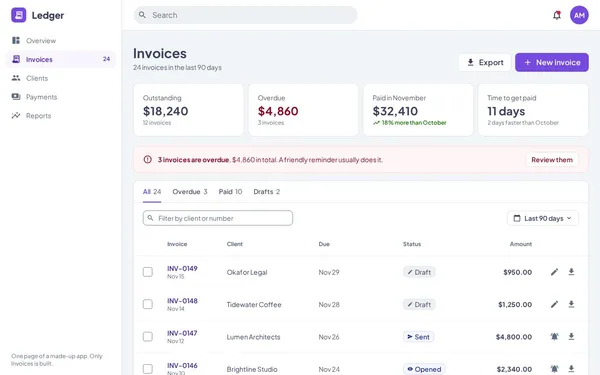
Alloy is a CSS framework that enables developers to build complete web app interfaces using pure HTML and CSS – no JavaScript required. The demo showcases a functional invoice management UI as a single HTML file. It targets frontend developers and designers who want to quickly implement structured, clean UI layouts.
✓ Pros
- +No JavaScript required – complete UI with pure HTML and CSS
- +Compact approach: entire app page can fit in a single HTML file
- +Clean, professional design with modern UI components
✗ Cons
- −Limited interactivity without JavaScript – no dynamic functionality
- −Little documentation and few community resources available
Use Cases
- →Prototyping web app interfaces without JavaScript dependencies
- →Creating invoice and dashboard layouts with pure CSS
- →Rapidly setting up admin panels and internal tools
- →Showcasing UI components as static HTML files
Who is it for?
Alloy is aimed at frontend developers and UI designers who want to quickly create structured web app layouts with minimal tooling.
Tags
What is Alloy?
Alloy is a CSS framework that enables complete web app interfaces without a single line of JavaScript. The demo illustrates this directly: a functional invoice management UI delivered as a single HTML file. Layouts, components, navigation – everything runs on pure HTML and CSS. This is not a toy approach, but a deliberate choice to eliminate JavaScript dependencies.
Core Features
- JavaScript-free UI: Complete app interfaces are built with pure HTML and CSS, with no build process or framework overhead.
- Single-file approach: An entire app page can be contained in a single HTML file, significantly simplifying sharing and deployment.
- Pre-built UI components: The framework provides building blocks for structured layouts such as dashboards, admin panels, and invoice views.
- Modern, clean design: Components follow a professional visual style that can be used directly for internal tools and prototypes.
- Prototyping without tooling: Anyone who needs to present an interface quickly doesn't need a Node server, bundler, or deployment setup.
Who is Alloy for?
Frontend developers and UI designers who want to sketch out interfaces quickly or present them in a static format. Particularly useful for internal tools, demo pages, or layouts where dynamic interaction is not required. Anyone who regularly delivers mockups as working HTML files will save themselves the detour through JavaScript frameworks.
The limitations are clear: forms don't save data, lists don't update, and data remains static. For production applications with real data exchange, Alloy is not a replacement for a full frontend architecture.
Context & Alternatives
Alloy occupies the space of lightweight CSS frameworks for structured app layouts. Well-known alternatives such as Tailwind CSS or Bootstrap offer more components and a significantly larger community, but also require more configuration and tooling. Pico CSS takes a similarly minimalist approach, though it remains more generic. Alloy's distinct differentiator is its demo as a working single-file app. Anyone who needs exactly this format – for presentations or quick handoffs – will find a straightforward starting point here.


