
AppScreen
FreemiumCreate App Store & Google Play screenshots directly in the browser
AI Summary
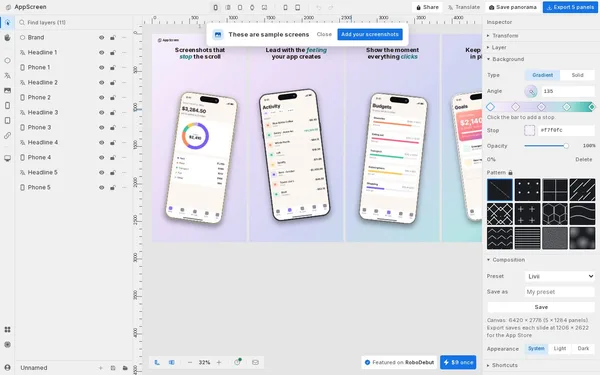
AppScreen is a browser-based screenshot editor that enables developers to design professional app store screenshots for iOS and Android on a wide panorama canvas and export them as ready-to-use PNGs. The tool supports iPhone, iPad, Apple Watch, and Android devices in the correct store formats. It is aimed at app developers, indie makers, and solo founders who want to create compelling store presentations without complex design tools.
✓ Pros
- +One-time payment of $9 with no ongoing subscription costs
- +Free to get started – no account or credit card required
- +Supports all major iOS and Android store formats with correct export sizes
✗ Cons
- −Desktop only – no mobile access
- −Free version heavily restricted to 3 projects and 3 slides per panorama
Use Cases
- →Create and export App Store screenshots for iPhone and iPad
- →Design Google Play screenshots for Android phones and tablets
- →Use the panorama canvas for consistent slide transitions across multiple screenshots
- →Let AI coding agents design screenshots automatically via an MCP connection
Who is it for?
Ideal for app developers, indie makers, and solo founders who want to quickly create professional store screenshots without design tools.
Tags
What is AppScreen?
AppScreen is a browser-based editor that lets app developers design store screenshots for iOS and Android directly in the browser and export them as PNGs. The standout feature of the workflow: all screenshots for an app store listing share a common panorama canvas, keeping visual transitions between individual slides consistent. Supported devices include iPhone, iPad, Apple Watch, and Android devices, each with the correct export formats required by the stores.
The tool costs a one-time fee of $9 USD. There are no subscription fees. Anyone who wants to try it first can get started without an account and without a credit card. The free version is limited to three projects and three slides per panorama.
Core Features
- iOS screenshots for iPhone, iPad, and Apple Watch in store-compliant export sizes
- Android screenshots for phones and tablets in Google Play format
- Panorama canvas as a shared workspace for all slides in an app listing, making consistent slide transitions easy
- PNG export directly from the browser, with no local installation required
- MCP interface for AI coding agents that can design screenshots in an automated fashion
Who is AppScreen for?
The tool is aimed at solo developers and indie makers who don't want to set up a Figma workflow just to create store screenshots. Those who already maintain a finished app design in Figma or Sketch will find more control there. AppScreen makes sense when the screenshot process needs to be completed quickly and no dedicated design setup exists.
AppScreen cannot be used on mobile devices. This is not a minor issue: anyone who wants to tweak a screenshot draft on the go won't be able to access it.
Classification & Alternatives
AppScreen is one of the specialized screenshot generators for app stores. Comparable tools in this segment, including AppLaunchpad and Previewed, are also browser-based and sometimes offer more ready-made templates, but require ongoing subscriptions in return. The one-time price of $9 is AppScreen's concrete differentiator. Anyone with a one-off project who wants to avoid monthly costs pays once and is done.


