WordCraft
Open SourceFast open-source word processor in Rust with .docx support
AI Summary
WordCraft is a native, open-source word processor written in Rust that reads and writes .docx files and supports formats such as .odt, .rtf, .html, and .md. It offers classic office features including a Ribbon, styles, tables, Track Changes, footnotes, and reference management, all with extremely fast layout performance. The tool is aimed at developers, authors, and anyone looking for a lean, offline-capable alternative to traditional word processors.
✓ Pros
- +Completely free and open-source with no restrictions
- +Extremely fast layout engine in Rust (1.4 ms for 188-page documents)
- +Broad platform support: macOS, Windows, Linux, FreeBSD, and web
✗ Cons
- −Still under active development with no stable release label
- −No cloud integration or real-time multi-user collaboration
Use Cases
- →Creating and editing Word documents (.docx) without Microsoft Office
- →Academic writing with citations, bibliographies, and tables of contents
- →Automating document workflows via CLI, JSON channel, or MCP server
- →Collaborative work using Track Changes and comment functionality
Who is it for?
Ideal for developers, technical authors, and power users looking for a fast, offline-capable, and scriptable open-source word processor with true .docx support.
Tags
What is WordCraft?
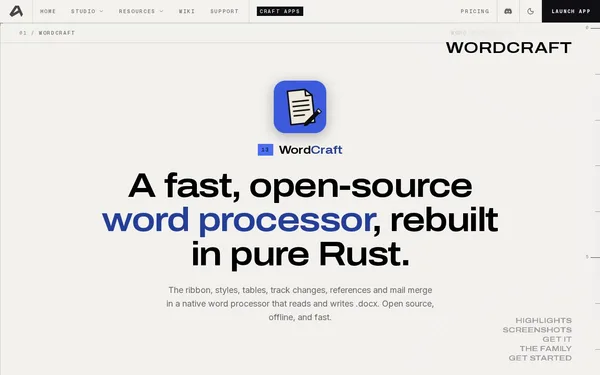
WordCraft is a native word processor written in Rust that reads and writes .docx files without requiring Microsoft Office to be installed. The project is fully open-source and runs on macOS, Windows, Linux, FreeBSD, and in the browser. The layout engine renders a 188-page document in 1.4 milliseconds. This is not a marketing claim – it is a measurable difference compared to the sluggish rendering pipelines of traditional office suites.
In addition to .docx, WordCraft supports the .odt, .rtf, .html, and .md formats. This makes it possible to import, convert, and share documents without being locked into proprietary ecosystems.
Core Features
- Broad format support: Read and write .docx, .odt, .rtf, .html, and .md
- Classic office interface: Ribbon menu, paragraph and character styles, tables, footnotes
- Academic writing: Reference management, citations, tables of contents
- Track Changes and comments: Change tracking for collaborative workflows without a live connection
- Automation: Control via CLI, JSON channel, or MCP server for document-based pipelines
Who is WordCraft for?
Developers who script document workflows will benefit most from the CLI and MCP server integration. Technical authors and academics who rely on citation features and reliable .docx output will find an offline-capable alternative to Google Docs or LibreOffice.
WordCraft is still under active development and does not yet carry a stable release label. Anyone who depends on a mature feature set without breaking changes should wait for a 1.0 tag. WordCraft does not support cloud synchronization or simultaneous editing of a document by multiple users.
Context & Alternatives
WordCraft fills the gap between simple Markdown editors and full office suites. LibreOffice Writer covers a similar feature set but comes with a significantly heavier runtime environment. For pure .docx compatibility without a GUI, the Rust library docx-rs is a programmatic alternative.
The key differentiator from all comparable products is the combination of native Rust performance, true .docx support, and scriptable control via MCP. Anyone looking to embed document generation into automated pipelines without relying on cloud-dependent SaaS will find a ready-to-use foundation here.